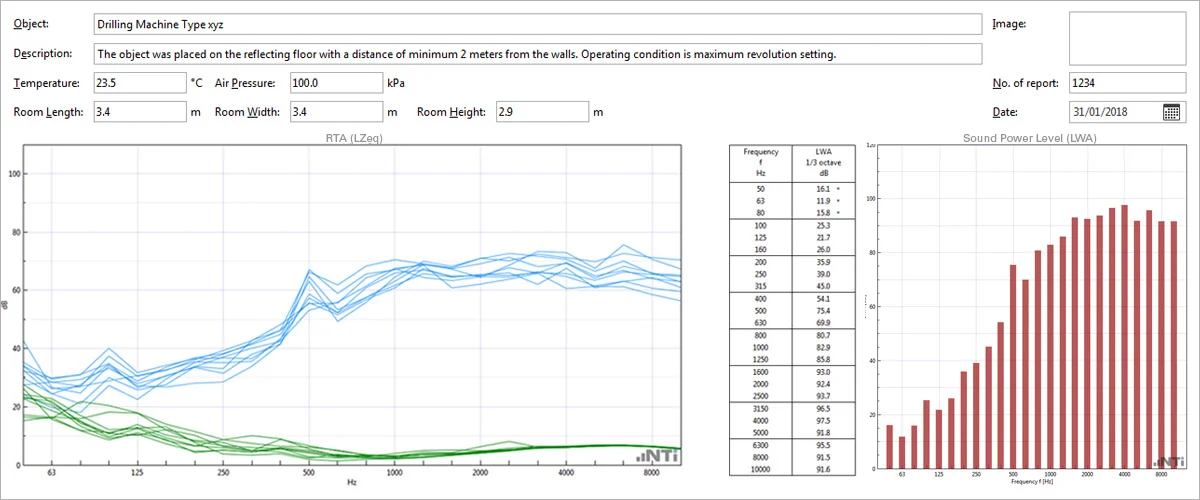
Sound Power Reporter is a PC-based software application that provides comprehensive reports for sound power measurements. Designed for industrial professionals, this comprehensive tool uses data gathered by the Sound Level Meter, and quickly returns graphical analysis of all measurement positions.
Conform to ISO 3741, ISO 3744, ISO 3746
ANSI-ASA S12.51 / S12.54 / S12.56
Standardized Reporting
Features
Multi-Views
Measurements View
Drag & drop the measurement data into the software. All measurement data is automatically assigned to the class of machine noise or background noise. The software supports data sets in octave and third-octave resolution.
Calculations View
Evaluate the individual data sets for machine noise, background noise and the Reverberation Time RT in the test room. The details of an applicable background noise correction K1and room correction K2 are presented. In case of measurements in free field condition is no room correction applied.
Results View
The results view displays the calculated sound power in a table and the standardized chart from 50 Hz to 10 kHz. Reports with the single number ratings LWA or LWZ may be selected.
Evaluate Sound Power Reporter now
Feel free to test the Sound Power Reporter software with demo data. Sound Power Reporter is a free-to-use PC software. The data import from the Sound Level Meter is chargeable.
System requirements: PC with Windows Vista, 7, 8.x, 10, 11
Get the Sound Power Reporter Software
The purchase of a Sound Power Reporter 365 subscription allows the unlimited import of measurement data from one instrument into the Sound Power Reporter PC-Software for a period of one year. Data which has been recorded prior the subscription may then also be imported. Alternatively, a permanent license is available for each instrument.
Installation on multiple PCs
The Sound Power Reporter software can be installed on multiple computers. This provides professionals with the freedom to distribute their measurement projects among team members and clients.
Technical Requirements
The full software functionality is enabled by having the following options installed on the instrument:
XL2 Extended Acoustic Pack
Configurations
Sound Power Reporter 365
annual subscription service
Sound Power Reporter 365 Company
annual company subscription service for 3 or more instruments
Sound Power Reporter Permanent
permanently activated license for one instrument
Applications
Sound Power
Determine sound power to ISO standards with automated reporting.
As a research laboratory invested in supporting communities through real time noise monitoring, I am very happy to exclusively use NTi instruments. Not only are the robust, easy to use, and provide high quality data, the customer service is outstanding and their team will work with you to find the most cost effective and appropriate solutions needed for problems ranging from easy to difficult.
Erica D. Walker MSc, ScD, RGSS Assistant Professor of Epidemiology, Brown University School of Public Health
I’ve been using the XL2 for over 15 years for short-term and long-term measurements in all kinds of indoor and outdoor environments all across the country. The meter gets me what I want, when I need it. It’s not only the best value for acoustical measurements, it’s the best tool period. I bet my company and reputation on XL2 results and it has not let me down. You would be crazy not to consider adding NTi instruments to your toolkit.
Herb Singleton, P.E., INCE Bd. Cert., President, Cross-Spectrum Acoustics
We at Constructure GmbH use two XL3 sound level meters for noise monitoring during demolition work. We are very satisfied with these highly user-friendly instruments, the online monitoring in the MeasurEye Cloud, the good advice and qualified support. Factory calibrations at NTi Audio are also handled very smoothly and without complications.
To provide the best experiences, we use technologies like cookies to store and/or access device information. Consenting to these technologies will allow us to process data such as browsing behavior or unique IDs on this site. Not consenting or withdrawing consent, may adversely affect certain features and functions.
Functional
Always active
The technical storage or access is strictly necessary for the legitimate purpose of enabling the use of a specific service explicitly requested by the subscriber or user, or for the sole purpose of carrying out the transmission of a communication over an electronic communications network.
Preferences
The technical storage or access is necessary for the legitimate purpose of storing preferences that are not requested by the subscriber or user.
Statistics
The technical storage or access that is used exclusively for statistical purposes.The technical storage or access that is used exclusively for anonymous statistical purposes. Without a subpoena, voluntary compliance on the part of your Internet Service Provider, or additional records from a third party, information stored or retrieved for this purpose alone cannot usually be used to identify you.
Marketing
The technical storage or access is required to create user profiles to send advertising, or to track the user on a website or across several websites for similar marketing purposes.